
LLM Prompts with External Event Triggers
Choose the right trigger—webhooks, queues, polling, or SSE—to balance latency, scalability, and reliability for production LLM workflows.

External event triggers let AI systems respond to events like user actions, updates, or schedules instantly - no manual intervention required. These triggers are key for creating real-time, automated workflows using prompt engineering for developers and large language models (LLMs). The article outlines four primary methods for triggering LLM workflows, each with unique strengths and challenges:
- Webhooks: Real-time HTTP pushes for instant responses.
- Message Queues: Reliable for handling high-volume tasks with built-in retries.
- Polling APIs: Scheduled checks for updates, easier to set up but slower.
- Server-Sent Events (SSE): Real-time streaming, ideal for dynamic user experiences.
Key considerations include latency, scalability, fault tolerance, and setup complexity. The choice of trigger impacts system reliability, cost, and user experience. For production environments, managing API limits, retries, and context is essential.
Quick Comparison
| Trigger Method | Latency | Scalability | Fault Tolerance | Setup Complexity |
|---|---|---|---|---|
| Webhooks | Real-time | High | Moderate (manual retries) | Low |
| Message Queues | Slight delay (async) | Very High | Very High (auto retries) | High |
| Polling APIs | Delayed (interval-based) | Low | Moderate | Very Low |
| SSE | Streaming (near-instant) | Moderate | Low (connection-sensitive) | Moderate |
Key Takeaways
- Webhooks are perfect for real-time scenarios but need careful failure handling.
- Message Queues excel in high-volume, reliable workflows but require more setup.
- Polling APIs are simple but consume more resources and introduce delays.
- SSE delivers dynamic, real-time updates but works best for specific use cases like streaming LLM responses.
Latitude, a platform for event-driven LLM workflows, simplifies this process with viral LLM tools for prompt management, collaboration, and evaluation. Its features include retry logic, performance monitoring, and support for multiple trigger types. The right trigger depends on your needs for speed, reliability, and scalability.
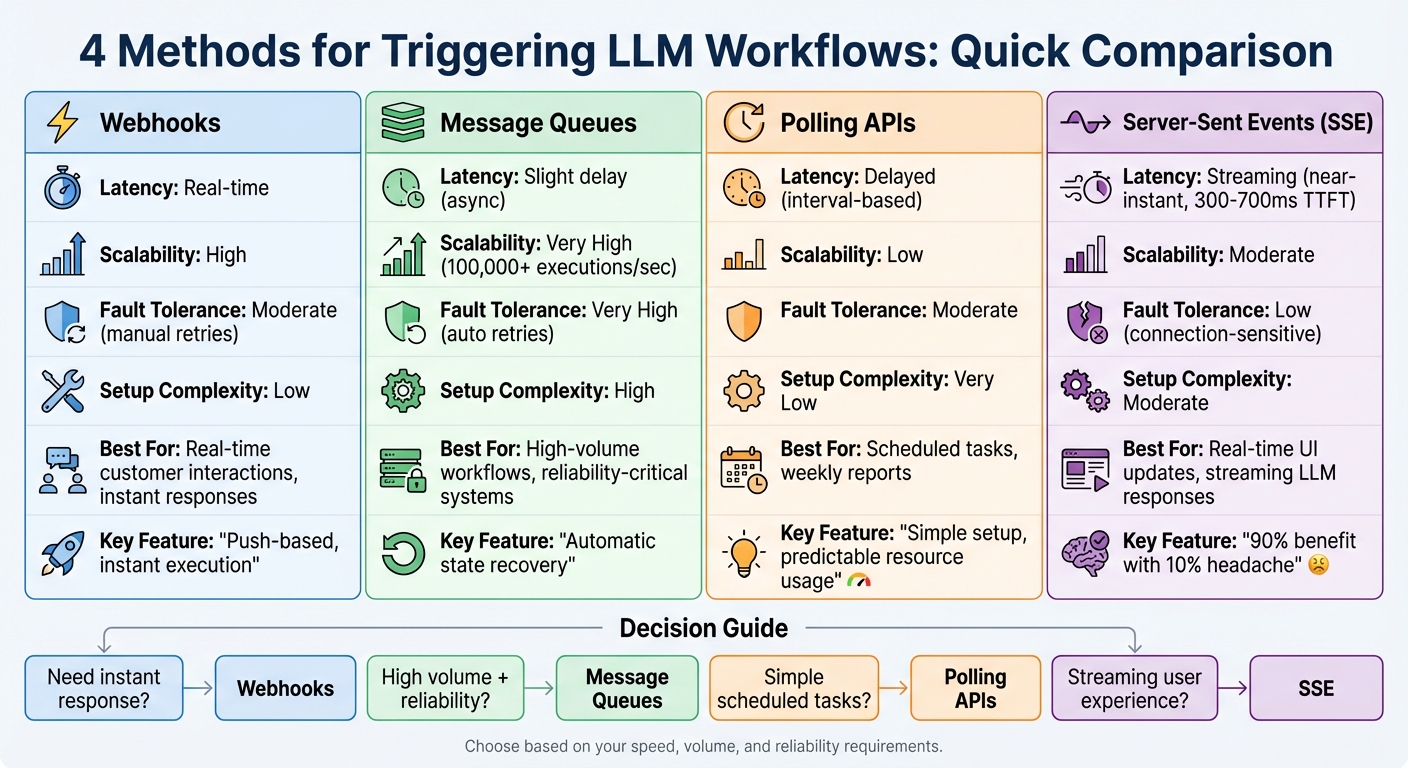
Comparison of LLM Trigger Methods: Webhooks vs Message Queues vs Polling vs SSE
1. Webhook-Based Triggers
Webhooks act as instant triggers for LLM workflows. Whenever an event takes place - like a database record update, a completed form submission, or a processed payment - the source system sends an HTTP POST request to your endpoint. This eliminates the need for slower batch processing that relies on scheduled intervals, enabling your LLM prompt to activate immediately. Let's break down the key aspects of webhook performance.
Latency
Webhooks are designed for near-instant execution. The moment an event occurs, processing kicks off right away. That said, Latitude requires your system to acknowledge the webhook within 5 seconds. This acknowledgment doesn't mean the LLM prompt must execute instantly - it can run asynchronously to maintain efficiency. To optimize performance, refine prompts to minimize token usage and reduce processing times.
Scalability
Webhooks are well-suited for handling high volumes of activity. Latitude sets a cap of 1,000 activations per hour to prevent overloading its infrastructure. If this limit is exceeded, the workflow will be temporarily disabled. For busy systems, it's essential to implement idempotency checks to avoid triggering the same LLM prompt multiple times due to duplicate webhook deliveries. Separating the receipt of events from the execution of prompts can further improve scalability and system reliability.
Fault Tolerance
Latitude's system is built to manage failures with automatic retries using exponential backoff for undelivered webhooks. To ensure security, verify the X-Latitude-Signature header using HMAC SHA-256. Additionally, secure your endpoint with HTTPS and consider whitelisting Latitude's IP address (18.193.205.15) for consistent delivery. Keep an eye on delivery logs to quickly address any latency issues or connection problems.
Setup Complexity
Setting up webhooks requires attention to detail, particularly around security and data validation. You'll need to configure a target URL within Latitude's workspace settings and implement signature verification on your server to block unauthorized requests. Each payload is signed with a unique secret key, which you validate against the X-Latitude-Signature header. Common webhook events include commitPublished (triggered when a prompt version is updated) and documentLogCreated (triggered when a prompt log is generated). While the initial setup demands careful authentication and error-handling measures, the result is a responsive, event-driven system that adapts to changes as they happen. This approach offers a clear advantage over alternative triggering methods, which will be discussed next.
2. Message Queue Triggers
Message queues act as a buffer for external events, allowing workers to process them at a steady, controlled pace. This approach is particularly effective for event-driven AI workflows, as it separates the task of capturing events from executing prompts. Unlike instant webhook triggers, message queues handle sudden spikes in activity without losing data. This buffering also provides an opportunity to evaluate key factors like latency, scalability, fault tolerance, and the complexity of setup.
Latency
When compared to webhooks, message queue triggers introduce only a slight delay, typically measured in milliseconds. Since execution is asynchronous, your LLM workflows can operate independently, without holding up other processes. This separation enables multiple workflows to run simultaneously, boosting the system's overall responsiveness.
Scalability
Message queues excel in managing large volumes of events. Some systems are capable of handling over 100,000 executions per second and billions of workflows every month. This scalability is achieved through distributed workers that process tasks in parallel. By setting concurrency limits, you can ensure that no single high-volume source monopolizes your LLM API resources. Tools like n8n, for instance, use a "Queue mode" to distribute tasks across multiple worker instances, offering far greater throughput than a single-instance webhook setup.
"Inngest completely transformed how we handle AI orchestration for us. Its intuitive DX, built-in multi-tenant concurrency, and flow control allowed us to scale without the complexity of other tools."
- Sully Omar, Co-founder & CEO, Otto
Fault Tolerance
In addition to handling high volumes, message queues are highly reliable when it comes to recovering from failures. Their execution model acts as a checkpoint system - if an LLM API call fails due to rate limits or network issues, the workflow automatically retries from the point of failure, avoiding the need to restart the entire process. This retry logic, often enhanced with exponential backoff, ensures tasks are eventually completed without manual intervention. To make the most of this feature, you should disable client-side retries (e.g., set max_retries=0 on your LLM client) and allow the orchestration layer to manage error recovery.
"On the AI engineer side, you can write your prompt, run it, and if something comes back that is not good, Temporal just throws an error and it will get retried."
- Neal Lathia, Co-Founder & CTO, Gradient Labs
Setup Complexity
Getting started requires integrating the SDK (available in Python or TypeScript) and configuring your orchestration platform to link events with workflow steps. Framework decorators like @step simplify this process by mapping events to specific steps in the workflow. While the initial setup might take some effort, the benefits - like automatic state management, built-in observability, and real-time performance monitoring - make it well worth the time, especially when scaling high-volume LLM applications.
3. Polling API Triggers
Polling API triggers operate by checking for changes at set intervals - whether hourly, daily, or following a cron schedule. Unlike webhooks, which push updates instantly, polling relies on periodic checks. This approach naturally introduces a delay in detecting events, as updates are only identified during the next scheduled check.
Latency
The time gap between checks creates a built-in delay that can stretch up to the full length of the polling interval. For applications requiring real-time responses - like live chat support or dynamic recommendations - this delay can lead to outdated or less relevant outputs. In workflows where up-to-date context is critical, polling may fall short.
Scalability
Polling can quickly become resource-intensive, especially when frequent API calls are made without yielding new data. This repetitive querying can strain system resources and consume API quotas unnecessarily. To maintain stability, activation limits are often enforced. In contrast, event-driven architectures are far more efficient in high-traffic environments, as they only activate when new events occur.
Setup Complexity
One advantage of polling is its relative simplicity during setup. It doesn’t require a public endpoint or signature verification, making it an easier starting point compared to webhooks. That said, you still need to handle key tasks like managing authentication (e.g., API keys), defining data schemas, and implementing retry mechanisms with exponential backoff for failed requests.
Despite being simpler to configure initially, polling’s inherent delays and resource demands make it less efficient compared to the instant responsiveness of event-driven triggers discussed earlier.
4. Server-Sent Events Triggers
When it comes to triggering methods, Server-Sent Events (SSE) stands out for its ability to provide continuous, real-time streaming. SSE operates as a push-based protocol, where the server streams data to the client as soon as it's available. This makes it a great choice for streaming LLM responses token by token, offering a more dynamic and engaging user experience.
Latency
SSE excels in reducing latency, delivering data almost instantly with minimal overhead. This enables a "Latency Theater" effect, where tokens appear progressively, giving the impression of a faster and more responsive application - even if the total generation time remains unchanged. Industry benchmarks suggest that a Time-to-First-Token (TTFT) in the range of 300–700 milliseconds creates a smooth and "snappy" user experience. This immediate responsiveness is a key reason why SSE is so effective under high-demand scenarios.
Scalability
SSE is designed to be lightweight and efficient, running over standard HTTP without requiring complex connection management or resource-heavy infrastructure. Unlike other protocols, it avoids common challenges like load balancers becoming overwhelmed or intricate proxy configurations. As Prathamesh Dukare from Procedure aptly puts it:
"SSE gets you 90% of the benefit with 10% of the headache".
Because the server only pushes updates when new data is available, SSE minimizes unnecessary network traffic compared to methods like polling, saving bandwidth and improving overall efficiency.
Setup Complexity
One of SSE's strengths is its simplicity. Setting it up involves implementing an EventSource on the client side to listen for real-time updates. To handle the incremental nature of LLM responses, you’ll need logic to parse and merge sequential events, such as chain-started, step, provider, and chain-completed. Additionally, it's important to manage interruptions like chain-error or tools-requested events, which may require user intervention before the process can continue.
SSE also includes built-in auto-reconnection, ensuring the connection automatically re-establishes if it drops. However, because SSE is a one-way protocol, it’s not suitable for scenarios requiring two-way communication. Despite this limitation, its ease of use and efficiency make it a strong choice for streaming applications.
Comparison of Trigger Methods
Selecting the best trigger method comes down to understanding your specific needs. Webhooks are known for their speed, offering instant push notifications that make them perfect for real-time situations like updating e-commerce inventory or managing customer engagement workflows. That said, they require extra effort for handling failures, as retries and idempotency checks often need to be set up manually.
On the other hand, message queues and durable execution platforms are the go-to choice when reliability is the top priority. These systems can handle over 100,000 executions per second while providing automatic state recovery and built-in retry capabilities. The downside? They involve more complex setup, including SDK integration and configuring workers.
Polling API triggers keep things simple but come with delays between when an event happens and when the workflow executes. They also consume more resources, making them unsuitable for high-volume scenarios. As a result, production systems frequently lean toward webhooks for their efficiency in real-time operations.
Here's a quick summary of the trade-offs between these methods:
| Trigger Method | Latency | Scalability | Fault Tolerance | Setup Complexity |
|---|---|---|---|---|
| Webhooks | Low (Real-time) | High | Moderate (Manual retries) | Low |
| Message Queues | Moderate (Async) | Very High | Very High (Auto-retries) | High |
| Polling API | High (Delayed) | Low | Moderate | Very Low |
| SSE | Very Low (Streaming) | Moderate | Low (Connection-sensitive) | Moderate |
The choice of trigger method is essential for ensuring that workflows within Latitude remain both reliable and efficient. For critical applications, durable execution platforms provide strong fault tolerance and state recovery. Meanwhile, for simpler integrations where speed and ease of use are key, webhooks deliver a fast and lightweight solution. These comparisons help lay the groundwork for implementing external event triggers in Latitude's event-driven LLM workflows.
Using Latitude for Event-Driven LLM Workflows
Latitude takes the trigger-based approach to the next level, offering a unified, production-ready platform for managing event-driven workflows with large language models (LLMs). At the heart of this platform is the AI Gateway, which acts as a stable proxy between your application and the AI models. This setup allows you to update prompts directly from the user interface without needing to redeploy code. This separation is crucial for fast iterations in systems where you need to tweak prompt logic while keeping endpoints steady for webhooks or scheduled triggers.
The platform also features a collaborative workspace where engineers and domain experts can work together to develop prompts and fine-tune datasets. Organizations using this structured collaboration have reported up to a 40% improvement in prompt quality, as measured by combined technical and domain-specific evaluations. Teams can seamlessly refine prompts using PromptL, Latitude's templating language, which supports variables, loops, and conditionals. This collaborative environment not only improves the quality of prompts but also simplifies monitoring and evaluation down the line.
Latitude keeps track of every interaction triggered by events, logging inputs, outputs, metadata, and token usage. For streaming workflows, Server-Sent Events (SSE) provide granular updates on each step’s execution status. This feature makes it easy to identify and address any issues that arise during complex, multi-step processes. Even under heavy event loads, Latitude ensures system stability.
One of Latitude’s standout features is its evaluation framework for event-driven workflows. You can conduct assessments in Live Mode for ongoing real-time monitoring or Batch Mode to test prompt updates against predefined datasets before deployment. The system supports three evaluation methods: using an LLM as a judge for subjective factors like tone and clarity, applying programmatic rules for objective checks like JSON validation, and incorporating human-in-the-loop reviews to capture nuanced preferences. Pablo Tonutti, the Founder of JobWinner, highlights the impact of this approach:
"Tuning prompts used to be slow and full of trial-and-error… until we found Latitude. Now we test, compare, and improve variations in minutes with clear metrics and recommendations."
Latitude doesn’t stop there. Its Prompt Suggestions feature uses evaluation data to automatically refine prompts over time, ensuring continuous improvement. With support for webhook, email, and cron triggers, combined with strong security and observability features, Latitude provides flexible and reliable control over event-driven LLM workflows.
Conclusion
Selecting the right trigger method for your LLM workflows hinges on three key factors: how fast you need to respond, the volume of events you expect, and the level of reliability required. Webhooks are ideal for scenarios where immediate action is critical, such as responding to customer support tickets. They push data as events occur, avoiding the delays associated with polling. On the other hand, polling triggers are well-suited for recurring tasks like generating weekly market reports or conducting scheduled data quality checks, offering predictable resource usage with minimal manual effort.
For high-volume production environments or when dealing with unstable APIs, durable execution platforms are a must. These platforms enhance reliability by automating retries and handling errors, delivering a significant boost in reliability - often 10x to 100x compared to manual error management.
Server-Sent Events (SSE) are particularly effective for real-time user interface updates, such as streaming LLM responses where users expect to see text appear dynamically as it’s generated. The decision between push-based methods (like webhooks and SSE) and pull-based methods (like polling) often comes down to efficiency. Push methods respond instantly, reducing resource overhead, while polling can consume resources checking for updates that might not exist. These trade-offs highlight the need to choose trigger methods that align with both your operational needs and your team's technical capabilities.
Team expertise also plays a significant role. Organizations with limited technical resources often start with no-code platforms for straightforward workflows, while teams managing complex, multi-agent systems tend to rely on code-first solutions that allow for custom logic and concurrency management. Planning for scalability is crucial to avoid costly migrations later, especially as demand rises for more robust and flexible trigger methods.
The most effective implementations combine multiple trigger methods tailored to specific workflow requirements. For example, webhooks handle real-time customer interactions, batch processes run on scheduled polling, and SSE powers streaming responses - all integrated within a unified platform. Tools like the Latitude platform exemplify this approach, providing centralized observability, evaluation, and continuous optimization across every trigger type.
FAQs
What’s the difference between webhooks and message queues for triggering LLM workflows?
Webhooks are push-based triggers that send an HTTP request to a specific URL the moment an event happens - whether it’s a database update or an incoming email. This enables near-instant responses, making webhooks perfect for workflows that demand immediate action. However, they rely on the external system being available at the exact moment the event occurs, which can pose challenges in certain cases.
In contrast, message queues use a pull-based system. Events are stored in a queue and processed later, offering greater flexibility by separating the event producer from the consumer. This setup allows for features like buffering, retries, and delayed processing. While the focus here is on webhooks, diving deeper into message queues may require additional resources to fully understand how they could work as triggers for LLMs.
What are the benefits of using Server-Sent Events (SSE) for real-time updates in LLM workflows?
Server-Sent Events (SSE) offer a way for servers to send real-time updates to clients using a single, persistent HTTP connection. For applications powered by large language models (LLMs), SSE makes it possible to stream model outputs as they’re generated, delivering a smooth, real-time experience without delays. Unlike WebSocket connections, SSE eliminates the extra setup and complexity, managing tasks like reconnections and event ordering on its own.
In trigger-action workflows, SSE provides immediate responses to external events, allowing automation pipelines to react instantly instead of waiting for batch processes. This one-way, low-latency communication is perfect for use cases like live chat, step-by-step answer generation, or monitoring dashboards where quick updates are critical.
When is it better to use polling APIs instead of event-driven triggers?
Polling APIs are a solid choice when the upstream service doesn’t support push-based notifications like webhooks, or when you need to control how often updates are checked. They’re especially useful in scenarios like legacy systems that only offer a GET-latest-state endpoint, data that updates infrequently (such as nightly reports), or situations where managing API call limits is critical. By scheduling these checks yourself, you can strike a balance between latency and resource usage - making polling a straightforward and effective solution if minor delays are acceptable.
In workflows involving large language models (LLMs), polling is a good fit for tasks such as scheduled report generation, batch data processing, or routine health checks. It eliminates the complexity of handling webhook subscriptions while offering predictable resource usage, particularly for moderate traffic levels or simpler system architectures.
That said, if your use case demands real-time updates, frequent data changes, or aims to minimize unnecessary API calls, event-driven methods like webhooks or event streams are generally more efficient. Polling shines when simplicity and control are more important than achieving low latency or handling high scalability.
