
Multi-Modal Prompt Integration: Data Prep Guide
Guide to cleaning, aligning, and validating text, image, and audio for effective multi-modal prompts, plus fusion strategies and YAML workflows.

Multi-modal prompts combine text, images, audio, and other data types to enhance how AI systems process and respond to complex inputs. This approach powers advanced AI models like GPT-4o and Google Gemini, enabling them to handle diverse tasks like analyzing product defects with both images and audio recordings. However, the key to maximizing performance lies in proper data preparation.
Here’s what you need to know:
- Multi-modal prompts use placeholders (e.g.,
image_path,voice_recording) to integrate various data formats like JPG, MP3, and PDFs. - Data preparation is critical: Poor data quality can reduce model accuracy by up to 8.2%.
- Preprocessing steps include cleaning text, resizing images, and normalizing audio to ensure consistency.
- Alignment ensures text, images, and audio are synchronized for accurate interpretation.
- Fusion strategies - Early, Intermediate, or Hybrid - determine how models combine inputs for better performance.
- Validation involves error handling, quality checks, and YAML-based workflows for efficient preprocessing.
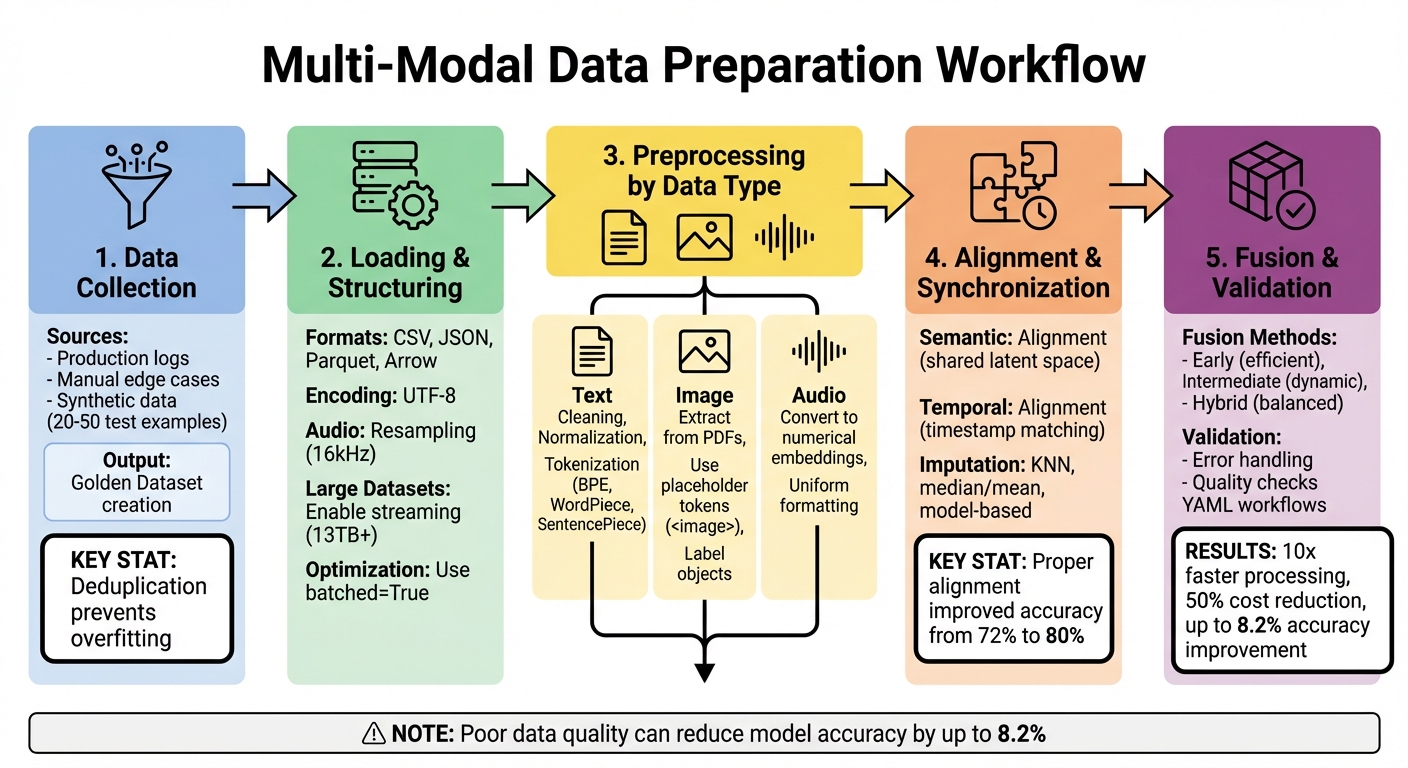
Multi-Modal Data Preparation Workflow: 5-Step Process Guide
Preparing Multi-Modal Datasets for Prompt Engineering
Building a multi-modal dataset involves organizing data to be compatible with large language models (LLMs). The better the quality of your dataset, the more effective your prompts will be.
Data Collection Methods
To assemble your dataset, draw from production logs, manually crafted edge cases, and synthetic data. Production logs offer insights into real-world user interactions, while edge cases help identify potential failure points. Synthetic data, generated by AI models, allows you to create 20–50 test examples, enabling you to explore variations.
Develop a Golden Dataset - a carefully curated set of inputs paired with their "ground truth" outputs. This dataset serves as a benchmark, helping you detect regressions when updating prompts and providing a reliable baseline for comparing different versions. Think of it as a quality control tool that flags issues early.
"Deduplication is key to unbiased model training. It ensures that our model encounters a diverse range of examples, not just repeated variations of the same data." - Jayant Nehra
To avoid overfitting, remove duplicates using techniques like lexical, fuzzy (MinHash/LSH), and semantic deduplication. For missing or incomplete data, apply methods such as KNN for random omissions and model-based imputation for systematic gaps. For instance, a telecom company boosted model accuracy from 72% to 80% by strategically imputing missing customer support data.
Once your dataset is ready, the next step is to load and structure it for seamless integration with LLMs.
Loading and Structuring Your Data
Use tools like the Hugging Face datasets library to work with formats such as CSV, JSON, Parquet, and Arrow. For quick prototyping, libraries like ImageFolder and AudioFolder can automatically generate features and labels. If you're handling massive datasets, such as the 13TB C4 dataset, enable streaming with streaming=True to process data without downloading it all at once.
Structure your dataset with clear input columns that align with your prompt parameters (e.g., customer_query or image_path) and optional label columns for expected outputs (e.g., expected_sentiment). Platforms like Latitude allow you to designate expected output columns as "labels", enabling automated evaluations such as Exact Match or Semantic Similarity. Ensure all text is encoded in UTF-8 and consistently formatted - whether in JSON, XML, or MDX - to ensure smooth tokenization. For audio data, resample it to match your model’s required sampling rate (typically 16kHz) using the cast_column method to avoid errors.
To optimize processing, enable batched=True in the map() function, which processes examples in groups and speeds up your pipeline. For environments with limited memory, use from_generator() to stream data directly from disk. These adjustments can make a significant difference in efficiency.
Preprocessing Techniques for Each Data Type
Preprocessing is all about preparing text, image, and audio data so it's clean, consistent, and ready for integration in multi-modal models.
Text Data Preprocessing
Start by cleaning your text. Get rid of unnecessary symbols, Unicode errors, and irrelevant content. Fix spelling and formatting issues, and standardize things like encoding, line breaks, and spaces. This helps avoid tokenization problems later on.
Normalization is key to simplifying text. Convert everything to lowercase, handle punctuation consistently, and use lemmatization if keeping context intact is important. When it comes to tokenization, subword methods like Byte-Pair Encoding (used in GPT), WordPiece (BERT), or SentencePiece are great for managing vocabulary size while handling rare or unknown terms.
Organize your text into structured formats like JSON, XML, or MDX. This makes it easier to extract data and include metadata. For chat-based models, split text into "system", "user", and "assistant" messages for better clarity. To remove near-duplicate content, use semantic deduplication tools like sentence embeddings with FAISS.
"Clean data ensures that the model works with reliable and consistent information, helping our models to infer from accurate data." - Latitude Blog
Image Data Preprocessing
If you're working with images, start by extracting them from unstructured formats like PDFs so they're ready for AI processing. Use clear categories and placeholder tokens (like <image>) to keep text and visual inputs aligned.
When handling text and images separately, you can generate placeholder text to match the number of multi-modal inputs. This prevents processor errors and keeps token outputs consistent. To save time with slower models, cache processor outputs to avoid repeating computations.
Labeling objects in image datasets helps supervised models identify patterns and relationships. If you’re dealing with noisy or incomplete image data, consider excluding it to keep your model's performance sharp.
Audio Data Preprocessing
Raw audio needs to be converted into numerical embeddings that represent its signals. Contextual embeddings work well for nuanced tasks, while subword embeddings help fill vocabulary gaps. Uniform formatting across audio files ensures consistency when integrating different data types.
A modular pipeline is the best way to preprocess audio. This setup allows you to tweak specific components without disrupting the entire workflow, keeping everything in sync across text, image, and audio data.
Once you've preprocessed each data type, the next step is aligning them for seamless multi-modal integration.
Aligning and Synchronizing Multi-Modal Data
Once the data is preprocessed, the next step is to align text, images, and audio so they convey consistent meaning and timing. This ensures your model accurately interprets the relationships between different modalities.
Cross-Modality Semantic Alignment
Semantic alignment is all about ensuring that different types of data - like text, visuals, and audio - carry consistent meaning when combined. To achieve this, inputs are mapped into a shared latent space, where their relationships can be directly compared. Tools like OmniAlignNet use techniques such as projection layers, self-attention mechanisms, and L2 normalization to minimize the distance between related modalities.
Contrastive learning plays a key role here. Using a CLIP-style symmetric cross-entropy loss, models are trained to pull related vision and audio inputs closer in the shared latent space while pushing unrelated samples apart. This prevents errors caused by interpreting modalities in isolation. Additionally, a large language model (LLM) can refine and merge independent captions from various modalities into a single, cohesive description.
These advanced methods have led to notable improvements in benchmark performance, all while reducing the number of training tokens required.
Next, let’s explore how to synchronize these modalities over time to ensure coherence in dynamic, time-sensitive data.
Temporal Alignment and Interpolation
Beyond semantic alignment, timing becomes a crucial factor when working with multi-modal data. Text, images, and audio often operate on different time scales or levels of granularity, which can create synchronization challenges. The process begins with timestamp matching to align all modalities.
When dealing with missing or asynchronous data, imputation techniques come into play:
- KNN imputation: Preserves relationships between variables and is ideal for complex datasets but demands higher computational resources.
- Median or mean imputation: A quicker solution for filling random gaps, though it may slightly distort data distributions.
- Model-based imputation: Offers the most accurate results for non-random missing data, though it carries a risk of introducing bias. For instance, in one telecom application, carefully handling missing data improved model accuracy from 72% to 80%.
To maintain temporal coherence, patch-based tokenization is particularly effective. Instead of processing data point by point, this method represents segments of time-series data, allowing models to better capture temporal dependencies. When combined with fine-grained timestamp-level alignment, this approach ensures that multi-modal prompts retain their timing and consistency across all data types.
Fusion Strategies for Multi-Modal Prompts
Comparing Fusion Methods
When combining text, images, and audio into a large language model (LLM), the fusion strategy you use determines how these different types of data interact during processing. A review of 125 multimodal LLMs developed between 2021 and 2025 highlights three main approaches: Early Fusion, Intermediate Fusion, and Hybrid Fusion.
Early Fusion blends non-text features - like images or audio - before they even enter the LLM. This method uses projection layers to convert these features into the language model's embedding space. Models such as LLaVA, Kosmos-1, and BLIP-2 rely on this approach because it’s computationally efficient and retains the LLM’s pre-trained abilities. For instance, the LLaMA-Adapter V2 model achieves multimodal functionality with fewer than 1 million additional parameters, all while keeping the LLaMA backbone frozen.
Intermediate Fusion integrates modalities directly within the transformer layers of the LLM. By using cross-attention mechanisms, the model can dynamically access visual or audio details at each generation step. Researchers Jisu An et al. from Seoul National University explain that this mid-layer cross-attention enhances contextual understanding by allowing the model to query visual details dynamically. Models like Flamingo, CogVLM, and LLaMA-Adapter V2 adopt this method for tasks that demand spatial reasoning or high-resolution data analysis.
Hybrid Fusion combines the strengths of both approaches. It uses early alignment for efficiency and mid-layer fusion for more precise interactions. This method is particularly useful for complex tasks, such as visual interface understanding, where both global context and fine-grained details are crucial. Models like CogAgent and ManipLLM exemplify this strategy.
Beyond fusion levels, different representation paradigms also play a role in how modalities are processed. Joint Representation merges all modalities into a shared space using self-attention, making it well-suited for tasks like visual question answering that require detailed reasoning. On the other hand, Coordinated Representation relies on separate encoders aligned through contrastive learning, excelling in fast retrieval and modularity. For applications needing both, Hybrid Representation combines coordinated alignment with a joint fusion module, balancing efficient search with deeper reasoning capabilities.
| Fusion Level | Integration Point | Primary Advantage | Example Models |
|---|---|---|---|
| Early | Before LLM input | Efficient and simple | LLaVA, Kosmos-1, BLIP-2 |
| Intermediate | Within Transformer layers | Dynamic, layer-wise interaction | Flamingo, CogVLM, LLaMA-Adapter V2 |
| Hybrid | Both before and within | Balances global context and fine details | CogAgent, ManipLLM |
Choosing the right fusion method depends on your specific needs and constraints.
Selecting the Right Fusion Approach
The fusion strategy you choose should align with your application’s goals and available resources. Early Fusion is a great option when you need to keep training costs low while maintaining the LLM’s pre-trained capabilities. This method is particularly effective for general captioning tasks or when working with limited computational resources.
For tasks requiring detailed spatial reasoning or high-resolution data, Intermediate Fusion is the better choice. By allowing the model to process visual details layer by layer, this method improves contextual understanding. However, it does require more computational power. If you’re working with high-resolution images, consider using an abstraction layer - like a Perceiver Resampler or Q-former - to produce fixed-length tokens, which can help manage computational demands.
When it comes to representation paradigms, Joint Representation is ideal for tasks that require deep contextual understanding through simultaneous interaction of all inputs. Alternatively, Coordinated Representation is better suited for applications that need flexibility, such as handling missing modalities or scaling to new data types without retraining. As Jisu An et al. suggest:
"Choose coordinated representation when retrieval efficiency, encoder flexibility, and robustness are priorities".
Keeping the LLM backbone frozen or lightly tuned not only preserves its reasoning capabilities but also minimizes training costs. Selecting the right fusion strategy can save both time and computational resources while optimizing performance.
Validation and Quality Control
Data engineers dedicate a significant portion of their time - about 80% - to ensuring the integrity of data pipelines. For multi-modal systems, having a robust error-handling process is critical to maintaining model performance. A well-designed pipeline typically includes three essential components: a PipelineStep for processing logic, a Data Validator to enforce quality standards, and an Error Handler to address exceptions.
Error Handling and Fallback Strategies
Different types of missing data require tailored recovery approaches:
- Random missing data (MCAR): Use KNN imputation to preserve relationships between data points.
- Partially random missing data (MAR): Apply median or mean imputation for quicker processing.
- Non-random missing data (MNAR): Opt for model-based imputation to achieve better accuracy.
Monitoring the health of the pipeline is equally important. Key metrics to track include:
- Data Accuracy: The percentage of records processed correctly.
- Data Completeness: The proportion of valid fields in the dataset.
- Error Rate: The frequency of processing failures.
Automated sanity checks and real-time validation filters can catch errors early, stopping them from escalating into larger issues before reaching production. These strategies help create resilient pipelines, setting the stage for more detailed configuration processes.
YAML Configuration for Preprocessing Workflows
Building on error-handling techniques, YAML configuration files simplify the creation of reproducible preprocessing workflows. These files are written in a human-readable format and define preprocessing logic, model parameters, and data paths. This approach not only ensures consistency but also allows you to adjust configurations without modifying the underlying code.
Latitude, for instance, uses YAML configurations to specify details such as the provider, model, temperature, and JSON schema at the beginning of prompts. For multi-modal applications, YAML files can dictate how various data types are validated, which fusion methods to apply, and what fallback strategies to implement when data quality issues arise.
To ensure consistency across preprocessing pipelines, Latitude employs a three-pronged evaluation system:
- LLM-as-Judge: AI-driven evaluations.
- Programmatic Rules: Code-based validations.
- Manual Evaluations: Human review.
The platform’s AI Gateway automatically logs metadata and performance metrics for every interaction, making debugging and quality monitoring more efficient. Additionally, curated datasets can be exported as CSVs and converted into JSONL formats for fine-tuning or further validation.
By implementing automated quality controls and scalable architectures, organizations can achieve 10x faster data processing and reduce ownership costs by 50%. Duncan McKinnon, ML Solutions Engineer at Arize AI, emphasizes the importance of automation:
"Automation is the key to reliability. Whether you're retraining a model or adding a new skill, every step that can be automated - should be."
These practices in quality control and configuration are essential for building reliable models, completing the multi-modal data preparation process from start to finish.
Conclusion
Getting your data ready for multi-modal prompt integration is a critical step in building successful AI systems. The methods discussed here - like cleaning, deduplication, aligning data across modalities, and fusion strategies - are the backbone of creating systems that are both reliable and production-ready. When done right, these practices can lead to impressive results: businesses leveraging automated quality checks and scalable architectures have reported processing speeds 10 times faster, a 50% reduction in costs, and accuracy boosts of up to 8 percentage points.
The secret lies in treating data preprocessing as a structured engineering process rather than an afterthought. Start by building modular pipelines with clearly defined components for validation and error management. Standardize your formats early - convert text to UTF-8 and work with structured templates - and incorporate real-time validation checks to catch errors before they escalate into larger problems.
To ensure smooth multi-modal integration, stick to these core principles. Whether you're handling text, images, audio, or a mix of them, the process remains the same: clean your data meticulously, align it across modalities, and validate it consistently. Tools like Latitude make this easier by offering YAML-based configuration workflows and automated evaluation systems that align perfectly with the preprocessing standards outlined in this guide.
FAQs
How does integrating multi-modal prompts enhance AI model performance?
Integrating multi-modal prompts can significantly boost the performance of AI models by enabling them to grasp tasks more thoroughly. When you combine text with other data types - like images, audio, or video - the model gains access to richer contextual cues. For instance, visual details can clarify ambiguous descriptions, while sound patterns might reveal intent. This approach not only improves accuracy but also reduces errors and unlocks advanced capabilities, such as image captioning, video-based Q&A, or workflows that require OCR (optical character recognition).
To ensure consistency across different models, it’s crucial to standardize how these inputs are prepared. Clear formatting and structured templates help prevent misinterpretation, simplify development, and ensure uniform results across various architectures. Tools like Latitude’s prompt-management solutions make it easier to design, test, and scale these multi-modal prompts, transforming them into dependable, production-ready AI systems.
What are the essential steps to prepare multi-modal data for LLM prompts?
Preparing multi-modal data for large language models (LLMs) involves a few key steps: cleaning, aligning, and formatting both text and visual inputs to ensure they work seamlessly with the model.
Data cleaning comes first. For text, this means normalizing it - like detecting the language, fixing spelling errors, or standardizing formats. On the visual side, images are resized, checked for corruption, and converted into a consistent format to maintain quality and uniformity.
Next is modal alignment, which ensures that text inputs - like captions or instructions - are correctly paired with their corresponding images. These pairings are typically stored in structured formats like CSV or JSON for easy access. Once aligned, the data is stored efficiently, often using tar files, which allow for quick access during training.
The final step is feature extraction. Text is broken down into tokens using methods like Byte Pair Encoding (BPE) or SentencePiece, while images are processed into pixel tensors or visual embeddings. This step ensures the data is fully prepared for use in multi-modal LLMs.
Platforms such as Latitude simplify this workflow by offering tools and pipelines that make the entire process more efficient and ready for production.
How do fusion strategies influence the processing of multi-modal prompts?
Fusion strategies define how inputs from different modalities - like images, audio, or tables - are combined into a single prompt for a language model. Each strategy comes with its own strengths and trade-offs.
Early fusion integrates raw data from all modalities into a single input before it reaches the model. This method can improve reasoning across modalities but often increases token usage and demands precise alignment of data formats.
Late fusion takes a different approach by processing each modality separately and merging the outputs afterward. While this preserves details unique to each modality, it can miss out on subtle interactions between them.
Hierarchical fusion offers a middle ground. It enables intermediate representations from different modalities to interact dynamically. This approach can improve alignment and flexibility but may introduce additional complexity to the system.
On Latitude, you can easily configure these strategies using PromptL’s modular tools. This flexibility lets you prioritize factors like token efficiency, reasoning capabilities, or processing speed, ensuring your multi-modal applications deliver the best results for your specific needs.
