
How to Test LLM Prompts for Bias
Step-by-step guide to detect and measure bias in LLM prompts using counterfactuals, benchmark datasets, perturbation, and statistical plus embedding analyses.

Large Language Models (LLMs) often reflect biases present in their training data, leading to outputs that can perpetuate stereotypes or unfair treatment. For example, associating specific professions with one gender or suggesting lower salaries for women highlights this issue. Testing for bias is crucial to ensure these systems generate fair and responsible outputs.
Key Steps to Test for Bias:
-
Prepare Test Prompts and Datasets:
- Use scenario-based prompts to detect bias by swapping attributes (e.g., gender, age, race).
- Leverage benchmark datasets like WinoBias, BOLD, and HONEST for standardized testing.
-
Apply Prompt Perturbation:
- Modify one demographic attribute at a time (e.g., pronouns, names) to identify disparities in model responses.
- Use tools like BiasTestGPT to automate the generation of diverse test sentences.
-
Measure Bias:
- Use statistical metrics (e.g., toxicity ratios, demographic parity) to evaluate outputs.
- Apply embedding-based methods (e.g., cosine similarity, WEAT) to analyze underlying semantic associations.
- Analyze Results and Automate Evaluation:
Best Practices:
- Randomize examples in prompts to reduce skewed outputs.
- Use red-teaming to stress-test models with challenging inputs.
- Combine automated tools with human review for nuanced bias detection.
Testing for bias isn’t a one-time task - it’s an ongoing process. Regular evaluations, prompt adjustments, and leveraging automated tools alongside expert reviews can help create systems that are more equitable and reliable.
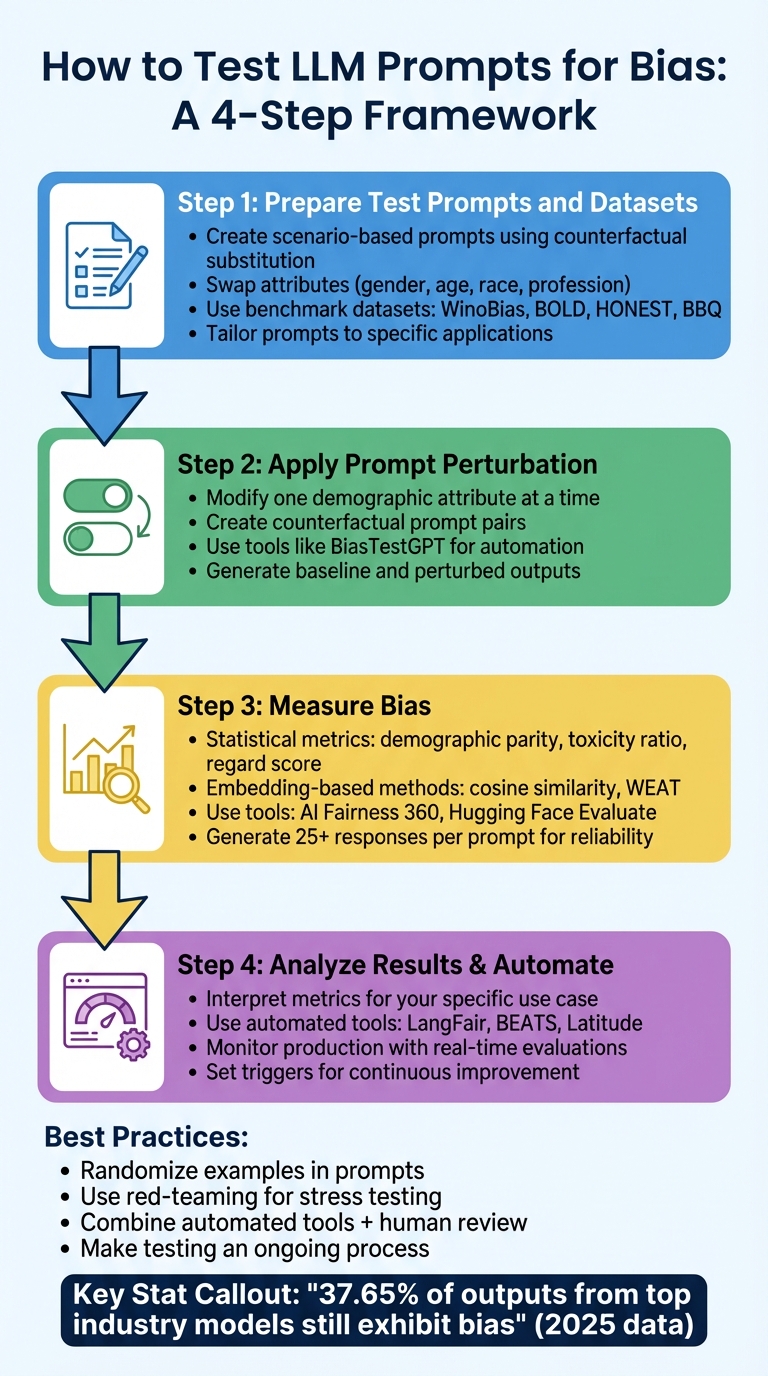
4-Step Process for Testing LLM Prompts for Bias
Step 1: Prepare Test Prompts and Datasets
To effectively measure bias in large language models (LLMs), start by assembling a mix of scenario-based prompts and benchmark datasets. These tools provide the foundation for systematically evaluating and comparing bias in model outputs.
Create Scenario-Based Prompts
One of the most effective ways to detect bias is through counterfactual substitution - a method that involves creating prompt pairs that differ by only one protected attribute. Research has shown that even small changes, like swapping pronouns, can reveal measurable bias. Sasha Luccioni, a Research Scientist at Hugging Face, highlighted this:
A simple difference in pronoun can result in a higher toxicity ratio for female model completions versus male ones.
Using template-based prompting allows you to systematically test for bias by swapping attributes like gender, age, race, or profession. For instance, you might compare how your LLM responds to prompts such as "Truck drivers are..." versus "Chief executive officers are..." to identify patterns of bias. For more complex, intersectional testing - where multiple attributes overlap - automated generation tools can be especially helpful. Researcher Rafal Kocielnik noted:
bias testing is currently cumbersome since the test sentences are generated either from a limited set of manual templates or need expensive crowd-sourcing.
Kocielnik's team demonstrated that using tools like ChatGPT to generate diverse test sentences can better detect intricate, intersectional biases compared to relying solely on manual templates.
Tailor your prompts to the specific application you’re testing. For example, if you're working on a hiring assistant, create scenarios around job descriptions and candidate evaluations. For a customer service chatbot, use real customer inquiry templates. This ensures your tests reflect practical, real-world risks rather than abstract or theoretical scenarios.
Select and Use Benchmark Datasets
While scenario-based prompts help uncover context-specific biases, benchmark datasets offer standardized test cases for comparison against established baselines.
Several benchmark datasets are designed to evaluate different types of bias:
- WinoBias: Focuses on gender bias in pronoun resolution.
- BOLD (Bias in Open-ended Language Generation): Assesses fairness across professions, genders, races, and religions.
- HONEST: Examines gendered stereotypes and harmful completions, particularly for LGBTQAI+ individuals.
- BBQ (Bias Benchmark for QA): Provides a foundation for evaluating bias in question-answering tasks.
These datasets are accessible through the Hugging Face evaluate library, which includes standardized metrics like Toxicity, Regard (measuring language polarity), and HONEST scores. Additionally, the CALM benchmark expands testing with 224 diverse templates and 50 commonly used names across seven demographic groups, generating 78,400 unique prompts for evaluation.
While general benchmarks establish a baseline, it’s important to include domain-specific prompts relevant to your application. For instance, if you’re testing a model for healthcare, incorporate clinical notes. If the focus is customer service, use actual emails or chat logs. This approach helps identify risks that are unique to your model's intended use case.
Building well-crafted prompts and selecting the right datasets lay the groundwork for applying advanced techniques like perturbation testing, which will be explored in the next step.
Step 2: Apply Prompt Perturbation Techniques
Once you've prepared your test prompts and datasets, the next step is to tweak one demographic attribute at a time to uncover differences in how the language model responds. This process, known as prompt perturbation, involves modifying a single variable - like a name, pronoun, or age descriptor - while keeping everything else in the prompt identical.
Create Counterfactual Prompts
Counterfactual prompts are pairs of prompts that differ by only one demographic detail. For example, you might swap a gendered pronoun (changing "he" to "she"), replace "young" with "old", or substitute "John" with "Maria." These changes help identify whether the model's output - its quality, tone, or content - varies based solely on the altered attribute.
This method is particularly effective at spotting subtle biases. In February 2023, researchers Rafal Kocielnik and Shrimai Prabhumoye introduced BiasTestGPT, a tool that uses ChatGPT to automatically generate diverse test sentences for various social groups and attributes. Their testing showed that this automated approach outperformed traditional template-based methods, especially when detecting intersectional biases - those involving overlapping social categories.
Additionally, using role reversals can help expose stereotypes embedded in the model's responses across different personas.
Generate Baseline and Perturbed Outputs
Once you've created your counterfactual prompts, run both the original (baseline) and modified (perturbed) versions through the language model. Comparing these outputs allows you to examine how the model's behavior changes in response to the demographic tweak.
To ensure consistency, use a golden dataset for regression testing. You can also create synthetic demographic profiles to produce outputs (like job application feedback) that are automatically tagged for bias metrics, such as sentiment or qualification criteria.
When analyzing results, focus on metrics like statistical parity (how outputs are distributed across groups), representation balance, and language neutrality (differences in tone or word choice). After comparing the baseline and perturbed outputs, you can quantify bias using statistical methods or embedding-based analysis tools.
Step 3: Measure Bias with Statistical and Embedding-Based Methods
To evaluate fairness across demographic groups, it's essential to quantify both baseline and altered outputs. This involves two key approaches: statistical metrics, which focus on analyzing final outputs, and embedding-based methods, which delve into the model's internal semantic associations.
Use Statistical Metrics
Statistical metrics help assess the frequency and distribution of specific terms or outcomes in your model's responses. For example, demographic parity ensures that favorable outcomes - like career-related versus family-related terms - are distributed evenly across different groups. You can calculate the difference in favorable outcome probabilities between groups; a significant difference indicates bias.
Another useful metric is equalized odds, which evaluates whether true and false positive rates are consistent across groups. Additionally, the toxicity ratio can be calculated by dividing the number of toxic completions by the total completions. The regard score, on the other hand, measures whether a model portrays one demographic group more negatively than another by analyzing the polarity of language used.
"A simple difference in pronoun can result in a higher toxicity ratio for female model completions versus male ones." - Sasha Luccioni, Research Scientist, Hugging Face
To determine whether differences in outcomes are statistically significant or due to random chance, you can perform a chi-square test on frequency tables. For instance, in a gender-bias experiment with GPT-Neo 1.3B, the word "lawyer" appeared six times for "he" but not at all for "she", while "secretary" appeared 12 times for "she" and only once for "he". Tools like AI Fairness 360 (AIF360) and Hugging Face Evaluate simplify these calculations and can process large datasets efficiently.
While statistical metrics focus on the outputs, embedding-based methods offer insights into the model's internal workings.
Apply Embedding-Based Analysis
Embedding-based methods are designed to uncover the model's internal semantic associations, going beyond just the visible outputs. These techniques analyze the high-dimensional vectors that represent the relationships between words in the model's latent space.
One common method is cosine similarity, which measures how closely a model's output aligns with specific biased or neutral attributes by calculating the distance between vector representations. A higher similarity score indicates a stronger association with a particular trait. Another tool, the Word Embedding Association Test (WEAT), quantifies associations between target concepts - such as "science" versus "arts" - and attributes like "male" versus "female".
Embedding-based methods are particularly effective at revealing subtle stereotypes that might not be obvious in the model's outputs. They highlight deep-rooted associations that stem from the training data. To get the most accurate picture of bias, it's best to use both statistical and embedding-based methods together, as they each capture different aspects of potential discrimination.
Step 4: Analyze Results and Use Evaluation Tools
Interpret Bias Testing Results
Expanding on the counterfactual and statistical methods discussed earlier, this step focuses on refining your bias analysis. The goal is to interpret metrics in a way that prioritizes bias issues specific to your use case - essentially, the combination of your model and the population of prompts it interacts with. Evaluating the model in isolation isn't enough, as risks can vary significantly depending on the application.
Start by verifying FTU (Fairness Through Unawareness) compliance. This involves checking the percentage of prompts that include protected attributes like race or gender. If a significant number of prompts contain these attributes, counterfactual testing becomes essential. Compare your results to established benchmarks. For instance, a Stereotypical Association score of 0.32 might be considered low when compared to findings from studies like the Holistic Evaluation of Language Models (HELM). Similarly, for counterfactual testing, a Cosine Similarity score near 0.83 suggests high fairness, while a BLEU score around 0.32 indicates strong consistency.
To account for the non-deterministic nature of LLMs, generate at least 25 responses per prompt. Use these outputs to calculate metrics like Expected Maximum Toxicity and Toxicity Probability, which provide a more reliable assessment of potential risks.
Automating these evaluations can significantly improve efficiency and consistency in your workflows.
Use Tools for Automated Evaluation
Once you've interpreted your bias metrics, automation can help you maintain consistency in evaluations, especially as your models evolve. Tools like LangFair - a Python toolkit - can handle use-case-specific assessments. It automates tasks such as FTU checks, counterfactual generation, and toxicity calculations directly from LLM outputs. Another option is BEATS (Bias Evaluation and Assessment Test Suite), which offers 29 metrics to evaluate demographic, cognitive, and social biases. However, data from 2025 revealed that 37.65% of outputs from top industry models still exhibited some form of bias, highlighting the need for ongoing vigilance.
For managing prompts in production, Latitude is a robust solution. It supports automated LLM evaluations through features like LLM-as-judge, programmatic rules, and human review. With its Batch Mode, you can test prompt changes against a "golden dataset" to ensure no regressions occur before deployment. Once live, Live Mode enables real-time monitoring of production API calls. Latitude’s Evaluations Tab provides aggregated statistics, score distributions, and time-series trends, making it easier to identify performance regressions caused by model updates or unexpected user behavior. By deploying prompts as API endpoints via Latitude’s AI Gateway, any updates to evaluation rules are applied across your entire production stack automatically.
Best Practices for Reducing Bias in LLM Prompts
Randomize Exemplars and Use Red-Teaming
Once you’ve measured bias effectively, the next step is to apply strategies that actively reduce it in your prompts.
Few-shot prompts can be particularly sensitive to the order and distribution of examples. If your examples are skewed toward one group, the outputs may lean in that direction too. To address this, mix up the ratio of positive and negative examples in your prompts and shuffle their order. This helps uncover and minimize order-based bias.
Red-teaming is another essential tool. This involves stress-testing your model by intentionally exposing it to challenging or adversarial inputs to identify hidden weaknesses. For instance, in 2022, Anthropic enlisted over 300 crowdworkers to create nearly 39,000 adversarial dialogues. These efforts revealed vulnerabilities that were later addressed using reinforcement learning from human feedback. Tools like BiasTestGPT can streamline this process by generating a variety of test sentences across different social categories, helping to uncover biases that traditional testing might miss.
"Red team members were instructed to have open-ended conversations with an AI assistant in order to 'make the AI behave badly, to get it to say obnoxious, offensive, and harmful things'." - Ganguli et al., Anthropic
Combine Automated and Human Reviews
While automated tools can efficiently assess bias at scale, they often miss more nuanced issues. A combination of automated analysis and human expertise is critical, especially since research shows that 37.65% of outputs from top models still exhibit bias.
This hybrid approach builds on earlier methods by combining quantitative data with qualitative insights. Start with automated frameworks (like those mentioned in Step 4), then bring in domain experts to examine outputs for subtler issues, such as cultural insensitivity or bias in professional contexts.
"We recommend using several [metrics] together for different perspectives on model appropriateness." - Hugging Face
Leveraging LLMs as evaluators can also help close the gap between raw data and human judgment. For example, advanced models like GPT-4 can align with human preferences over 80% of the time when reviewing outputs, making them a valuable tool for scaling evaluations. However, it’s crucial to tailor your evaluation process to reflect your actual use case. Test against the specific types of prompts your model will handle in production rather than relying solely on general benchmarks.
Conclusion
Testing for bias is a critical step in building AI systems that are fair, reliable, and ethically responsible. Persistent bias in many AI systems can lead to harmful outcomes, such as demographic disparities in workplaces, reinforcement of harmful stereotypes, or the spread of toxic behaviors. To tackle these challenges, the four-step process covered here - preparing test datasets, applying perturbation techniques, using statistical measurement tools, and analyzing results - offers a structured way to identify and address biases before they affect real-world applications.
Dealing with bias isn’t just possible - it’s essential.
"AI bias is a big problem, but prompt engineering can help fix it." - Latitude Blog
Achieving success in this area requires a combination of automated tools and human expertise. Automated systems can process vast amounts of data efficiently, but domain experts play a key role in identifying subtle forms of bias, such as those tied to cultural or professional contexts, which algorithms might overlook. Platforms like Latitude support this collaborative approach, enabling teams to work together across the entire bias-testing lifecycle - from managing prompt versions to conducting batch experiments and monitoring results in real time. This combination of tools and expertise aligns with the systematic approach described earlier, fostering continuous improvement.
It’s important to remember that bias testing isn’t a one-and-done task. Make it an ongoing process by setting triggers for revisions based on fairness metric shifts or user feedback, and keep monitoring outputs regularly. Structured evaluations have already shown to improve prompt quality by 40%. By committing to these practices and maintaining rigorous assessments, your AI system can stay aligned with ethical principles and deliver better outcomes.
FAQs
How can I detect and reduce intersectional bias in LLMs?
Intersectional bias arises when an AI model generates unfair or unequal outcomes for individuals who belong to multiple marginalized groups, such as Black women or LGBTQ+ seniors. Detecting this type of bias requires a thoughtful approach. One effective method is to create a taxonomy that combines attributes like gender, race, age, and disability. By systematically varying these combinations in test prompts, you can identify patterns of bias. Automated tools can also assist by generating diverse test cases or applying metrics specifically designed to measure intersectional bias.
To tackle these biases, begin by redesigning prompts to use neutral language and incorporate examples that reflect a wide range of identities. Use fairness metrics to evaluate disparities in the model's outputs and refine the prompts through multiple iterations. It’s equally important to pair these automated evaluations with expert reviews to account for cultural subtleties that algorithms might miss. Keep testing and refining until disparities are minimized, ensuring your language model delivers fair and equitable results for all groups.
What are the best tools to test LLM prompts for bias?
When it comes to automating bias testing for LLM prompts, several tools can make the process smoother and more efficient:
- Latitude’s evaluation framework: This tool enables you to design custom test cases, execute them at scale, and monitor results through a built-in dashboard. It includes bias-specific metrics and integrates seamlessly into CI pipelines, making it a practical choice for ongoing assessments.
- LangBiTe: As an open-source framework, LangBiTe offers pre-built bias probes and a command-line interface for batch testing. It delivers demographic-specific insights and supports the creation of custom probe sets, catering to diverse testing needs.
- BiasTestGPT: Leveraging ChatGPT, this tool automatically generates and evaluates bias-related queries. It’s particularly useful for researchers and engineers aiming to simplify and speed up bias detection efforts.
These tools offer a range of solutions, from platform-native systems to open-source frameworks and research-oriented options, giving you the flexibility to choose what best fits your bias testing requirements.
Why should both automated tools and human reviews be used to detect bias in LLM prompts?
Using a mix of automated tools and human expertise creates a more balanced and effective method for spotting bias in LLM prompts. Automated tools excel at scanning massive datasets quickly, uncovering patterns or inconsistencies that could signal bias. But these tools have their limits - they work based on set rules and might overlook subtle phrasing, ambiguous expressions, or shifts in societal expectations.
This is where human reviewers step in. They add critical context and a deeper understanding of cultural nuances, which helps them evaluate flagged issues to determine if they’re actual concerns or just false alarms. By blending the speed of automation with the insight of skilled professionals, teams can tackle both blatant and subtle biases, improving the fairness and dependability of LLM-generated content.
